How to connect Telegram Wallet
Telegram Wallet is the wallet built into Telegram. Connecting takes a minute, and then you can withdraw dollars to it.
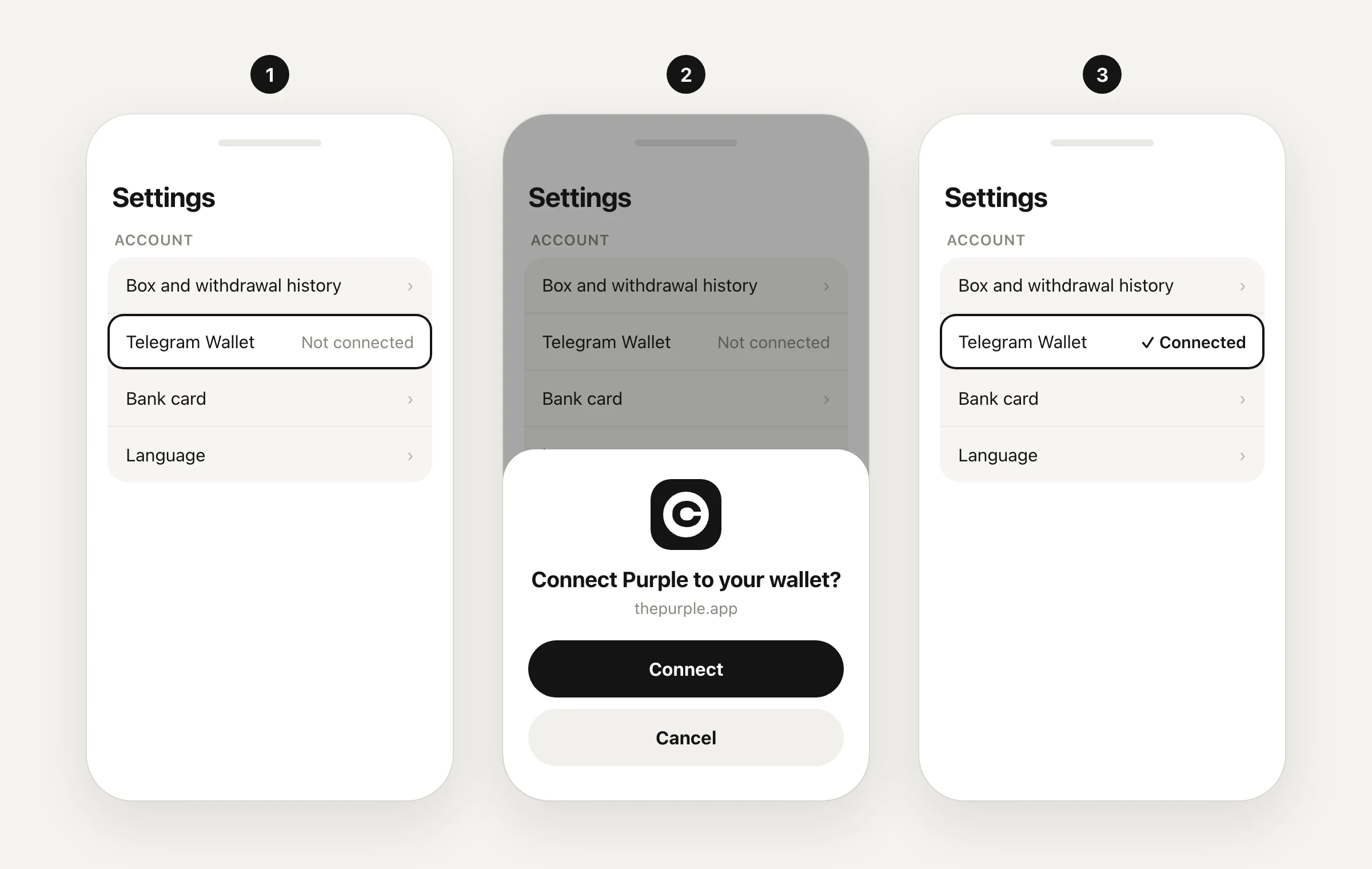
Steps
- In Purple, open Settings → “Account” → “Telegram Wallet”. The status is “Not connected”.
- Tap it: Wallet opens with a request to connect Purple.
- Confirm the connection in Wallet.
- Go back to Purple: the status changes to “Connected”.
You can also connect Wallet right from the withdrawal screen: tap “Telegram Wallet · not connected”.
If you do not have a Wallet yet
Telegram will offer to create one — follow its prompts. Write down the seed phrase and never show it to anyone: Purple will never ask for it.
Next
Withdraw dollars: “Withdraw” on the Home screen → “Telegram Wallet · Connected” → an amount from $1. All terms: Exchange and withdrawal.
Updated 24 September 2026Write to support